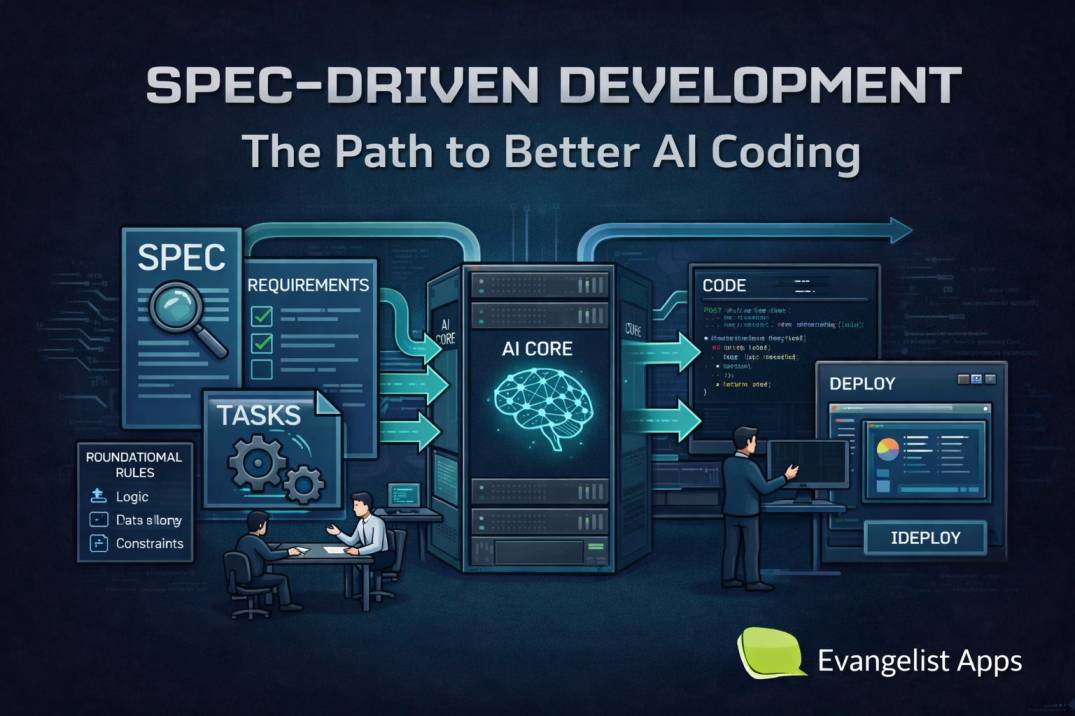


Spec driven development is becoming the smarter way to build with AI.
The reason is fairly simple: AI coding tools are now part of the mainstream workflow.
In Stack Overflow’s 2024 survey, 76% of respondents said they are using or planning to use AI tools in development, and 81% said productivity is the biggest benefit.
GitHub’s research also found that Copilot users completed a coding task 55% faster.
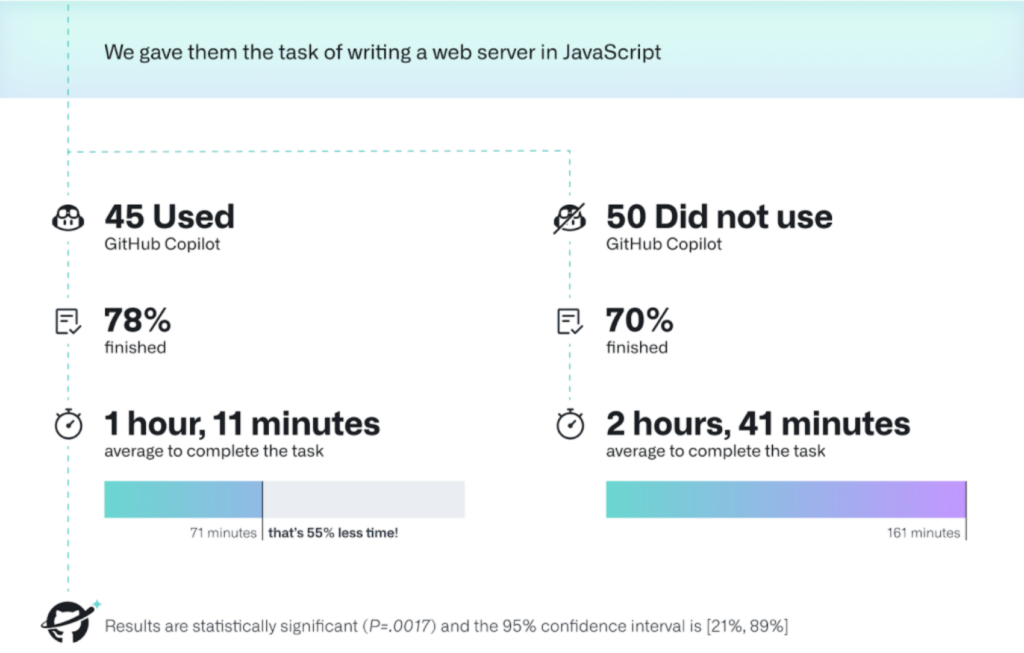
Source: Github Research
The problem is that AI-assisted development speed alone can create chaos.
Spec driven development adds structure before the code starts.
This approach helps teams move faster without losing control.
It is especially useful when you are using AI tools to draft code, plan features, or generate tests.
That is why spec driven development AI workflows are getting so much attention right now.
In this article, you will learn everything you need to know about spec driven development.
TL;DR: Spec Driven Development Explained
- Spec driven development means write the spec first, code second
- The spec defines goals, constraints, and expected behavior
- AI tools follow the spec instead of guessing requirements
- Best suited for production-grade software (not just prototypes)
- Works well with tools like GitHub Spec Kit, Claude Code, and Cursor
What Is Spec Driven Development?
Spec driven development is a software development approach where a structured specification is written first and used to guide implementation, often with AI-assisted coding tools.
A practical spec is usually short, structured, and testable. It should not read like a marketing copy. It should read like a build contract.
Instead of starting with code, you start with:
- The problem
- The user
- The expected outcome
- The constraints
The spec becomes the contract between humans and AI systems.
A useful spec usually answers these questions
- What are we building?
- Who is it for?
- Why does it matter?
- What should it do?
- What should it not do?
- How will we know it is correct?
What Does a Good Spec Look Like?
A strong spec is:
- Clear
- Structured
- Testable
- Focused on outcomes
A Practical Spec Example
# Feature: User Login System

## Goal
Allow users to securely log into the platform.

## Functional Requirements
- Email + password login
- Password reset via email
- Session management

## Non-goals
- Social login (v1)
- Multi-factor authentication (v1)

## Edge Cases
- Invalid email format
- Expired reset links

## Acceptance Criteria
- User can log in successfully
- Error shown for incorrect credentials
- Password reset works end-to-end
Why Spec Driven Development Matters for AI Teams
AI tools are so damn good at generating options.
But they are generally weaker at understanding your product intent unless you give it strong context.
Without structure:
- AI guesses
- Output becomes inconsistent
- Debugging becomes harder
That is where ai spec driven development helps.
The spec becomes the context layer.
The AI model can then work inside clear rules instead of guessing your requirements.
This matters because AI adoption is already mainstream, but trust is still mixed.
Stack Overflow’s survey already shows broad use and strong interest in AI tools, but also a need for structure and reliability.
That is exactly why spec-first workflows are growing. They help teams get the speed of AI without turning the code base into a pile of unreviewed prompts.
How To Do Spec Driven Development (Step-by-Step)
The philosophy behind implementing a spec driven development workflow is simple: define the intent, create the spec, turn it into a plan, break the work into tasks, and then implement.
Let’s understand the most practical implementation framework for spec-driven development work.
Step 1) Write the business goal first
Start with the problem and the goal first, not the tech stack.
Example:
# Feature: Invoice reminder emails

## Goal
Reduce unpaid invoices by sending reminders before due dates and after missed payments.

## Success criteria
- Email is sent 3 days before due date.
- Email is sent again 1 day after due date if unpaid.
- Users can disable reminders from settings.
This kind of spec gives AI something concrete to work from. It also gives your team a clean review point.
Step 2) Define constraints and non-goals
A spec should make boundaries obvious.
This reduces scope creep and prevents the model from inventing features you did not ask for.
## Non-goals
- No SMS reminders in v1
- No multi-language support in v1
- No payment collection inside the email
Step 3) Turn the spec into a technical plan
This is where architecture comes in.
Plan the data model, API endpoints, UI states, background jobs, and test strategy.
## Technical plan
- Store reminder preferences in user settings
- Create a scheduler job for due-date checks
- Add templates for pre-due and post-due emails
- Log delivery status for audit and support
Step 4) Break the work into tasks
Do not ask the AI model to build the whole feature in one shot. Break it into small, reviewable tasks.
## Tasks
- Create reminder settings schema
- Build scheduler job
- Add email templates
- Write unit tests
- Add integration tests
- Review edge cases
Step 5) Implement in small slices and test each slice
Each slice should match the spec.
If the implementation drifts, update the spec or correct the code. That is the discipline that keeps AI useful.
Step 6) Keep Spec Updated
The spec is a living document, not a one-time file.
A Simple Spec Template You Can Copy
Here’s one example spec template that you can use.
Use this format when you start a new feature:
# Feature name

## Problem
What problem does this solve?

## Users
Who needs this feature?

## Desired outcome
What should happen when it works well?

## Functional requirements
- Requirement 1
- Requirement 2
- Requirement 3

## Non-goals
- What is excluded from this version?

## Edge cases
- What could go wrong?

## Acceptance criteria
- How do we verify it is complete?
Spec Driven Development GitHub Workflow
GitHub’s Spec Kit is built around a clear flow: constitution, specify, plan, tasks, and implement.
It is designed to make AI coding more structured and repeatable.
The process emphasizes intent-driven development, rich specs, and multi-step refinement instead of one-shot code generation.
A practical GitHub flow looks like this:
- Create the project constitution.
- Write the feature spec.
- Build the technical plan.
- Split the plan into tasks.
- Implement step by step.
- Review changes against the spec.
Example Command Flow
| /speckit.constitution /speckit.specify /speckit.plan /speckit.tasks /speckit.implement |
This structure ensures AI works in stages, not guesses.
Claude Code Spec Driven Development Workflow
Claude Code works well for spec driven development when you use persistent project instructions.
Anthropic’s docs say CLAUDE.md files provide persistent instructions that Claude loads at startup, and .claude/rules/ can scope behavior more precisely.
That makes Claude a strong fit for spec-first work.
Example: CLAUDE.md
# Project Rules

- Always read spec before coding
- Do not exceed defined scope
- Write tests for every feature
- Ask for clarification if unclear
Why It Works
- Keeps context across sessions
- Reduces AI drift
- Enforces consistency
A clean Claude workflow looks like this:
# CLAUDE.md

## Project rules
- Read the feature spec before coding.
- Do not add scope outside the spec.
- Write tests before marking work complete.
- Update the spec if requirements change.
Then keep the actual feature requirements in a separate spec file. This keeps the instruction layer and the feature layer cleanly separated.
Best use case for Claude Code
Claude Code is especially useful when your team wants durable context across sessions, because its memory files and rules are loaded at startup. That helps reduce drift during long projects.
Cursor Spec Driven Development Workflow
Cursor is strong when you want an AI editor that can plan before it codes.
Cursor’s Plan Mode creates a detailed implementation plan before any code is written, asks clarifying questions, and generates a reviewable plan.
That maps neatly to spec driven development.
Workflow
- Write spec
- Generate plan
- Review plan
- Execute tasks
Example Prompt
| Create a step-by-step implementation plan based on this spec. Do not write code yet. |
This prevents premature coding and improves accuracy.
Best use case for Cursor
Cursor is a strong choice for features that touch multiple files, need research, or need approval before coding. That is exactly the kind of environment where spec-first development works well.
Best Spec Driven Development Tools You Can Use
The best spec driven development tools are the ones that help you store intent, plan work, and keep the model inside guardrails.
The strongest current options are –
- GitHub Spec Kit,
- Claude Code, and
- Cursor.
1. Use GitHub Spec Kit when
- You want a formal spec-to-task workflow.
- You need a repeatable team process.
- You want the spec to stay close to the code base.
2. Use Claude Code when
- You want persistent project instructions.
- You want rules to live in markdown.
- You want strong context across sessions.
3. Use Cursor when
- You want AI-assisted planning before implementation.
- You want an editable plan view.
- You want a smoother workflow for multi-file tasks.
Spec Driven Development vs Vibe Coding
Spec driven development and vibe coding are not the same thing.
Vibe coding is fast and loose.
You ask the model to generate something, then you keep refining it until it feels right. That can be useful for prototypes, throwaway experiments, and early idea validation.
Spec driven development is tighter.
You define the requirement first, then build against it. That makes it better for production systems, team collaboration, and long-term maintenance.
Here is the practical difference:
- Vibe coding: explore first, structure later.
- Spec driven development: define first, implement later.
5 Common Mistakes to Avoid in Spec Driven Development
Here are some mistakes that people often make running spec driven development work.
#1. Writing vague or high-level specs
If your spec is unclear, AI will fill the gaps with assumptions. This leads to inconsistent or incorrect output.
❌ Bad example:
| Build a dashboard for users. |
✅ Better example:
| Build a dashboard where users can:– View last 30 days activity– Filter by date range– Export data as CSV |
Fix:
- Define clear inputs and outputs
- Add acceptance criteria
- Include at least one user flow
#2. Not defining constraints and non-goals
Without boundaries, AI tends to expand scope and introduce features you didn’t ask for.
Common issue: You ask for login → AI adds OAuth, MFA, roles, etc.
Fix:
## Non-goals
- No social login
- No multi-factor authentication
- No admin roles
Constraints reduce unnecessary complexity and keep development focused.
#3. Trying to generate everything in one prompt
Large prompts usually result in messy, hard-to-maintain output.
❌ What not to do:
| Build a full e-commerce platform with frontend, backend, auth, and payments. |
Fix:
## Tasks
- Setup project structure
- Build authentication
- Add product listing
- Implement cart logic
Smaller tasks lead to cleaner, more reliable AI output.
#4. Skipping the planning phase
Jumping directly from spec to code leads to poor architecture and unnecessary rework.
Common problems:
- Duplicate logic
- Poor database design
- Missing edge cases
Fix:
## Technical Plan
- Use PostgreSQL
- Create REST APIs
- Add background jobs
Always validate the approach before implementation.
#5. Treating the spec as a one-time document
Specs that are not updated quickly become outdated and useless.
Requirements evolve. Your spec should too.
Fix:
## Change Log
- v1: Initial release
- v1.1: Added retry logic
Treat your spec like code. Version it, update it, maintain it.
How Evangelist Apps Helps You Implement This
Spec driven development only works when your specs turn into real, scalable products.
That’s where Evangelist Apps’ AI Product Engineering Services come in.
We help you:
- Turn ideas into clear, execution-ready specs
- Set up AI-first development workflows
- Build and ship scalable AI products faster
- Reduce rework with structured, spec-first delivery
Building with spec driven development?
We help you move from spec → system—fast, structured, and production-ready.
Book a FREE Consulting Call with Us.
F.A.Q
Q. What is spec driven development?
Spec-driven development means writing a clear spec first, then using it to guide AI-assisted coding, tasks, and QA. It reduces ambiguity and makes output much more predictable.
Q. How to do spec driven development?
Write a clear spec, create a plan, break into tasks, implement in small steps, and validate against the spec continuously.
Q. Is spec driven development useful for AI?
Yes. It improves AI output quality by providing clear instructions, constraints, and context.
Q. What tools support spec driven development?
GitHub Spec Kit, Claude Code, and Cursor are the most commonly used tools.
Q. Is spec driven development better than prompt engineering?
Yes for production use. Prompting helps generate outputs, but spec driven development ensures correctness and structure.