

67% of DevOps teams have increased their investment in AI over the past year alone.
The shift is not speculative. It is measurable, budgeted, and accelerating.
Yet for many engineering leaders, the question remains the same:
“How to use AI in DevOps in a way that delivers real operational value, not just another layer of tooling?”
Traditional automation handles repetitive tasks well. It runs scripts, triggers pipelines, and deploys code on schedule.
But it cannot predict a build failure before it happens.
It cannot triage a flood of alerts by severity.
It cannot learn from last month’s incidents to prevent next week’s outage.
That is where artificial intelligence introduces a fundamentally different capability.
This guide walks through the practical applications, implementation steps, and strategic considerations that enterprises need to adopt AI in DevOps effectively.
Whether you are evaluating your first AI integration or scaling across your software delivery lifecycle, this guide will provide a structured path forward.
What Is AI in DevOps?
AI in DevOps refers to the use of artificial intelligence and machine learning techniques to improve software development and IT operations.
AI systems analyze DevOps data and help automate decision-making processes. These systems learn patterns from historical data and provide insights that help engineers improve reliability, efficiency, and speed.
Typical DevOps data sources include:
- CI/CD pipeline logs
- code repositories and commit history
- infrastructure metrics
- monitoring alerts
- incident management records
- application performance data
By analyzing these data sources, AI systems can identify patterns that humans may miss.
Core capabilities of AI in DevOps
AI brings several capabilities to DevOps environments:
- anomaly detection in system behavior
- automated log analysis
- predictive infrastructure monitoring
- intelligent test automation
- deployment risk prediction
- incident root cause analysis
Instead of replacing engineers, AI works as an intelligent assistant that helps teams operate complex systems more efficiently.
Core AI Technologies Powering DevOps Automation
Several AI disciplines contribute to the DevOps automation. Each addresses a different operational need:
- Machine Learning (ML): Learns from past build results, deployment metrics, and incident logs to detect patterns and predict failures before they reach production.
- Natural Language Processing (NLP): Parses unstructured data such as logs, commit messages, and support tickets to surface meaningful insights and categorize issues automatically.
- Predictive Analytics: Analyzes usage trends, seasonal traffic patterns, and historical deployment data to forecast infrastructure needs and identify risk areas.
- Generative AI: Generates code, test cases, infrastructure-as-code configurations, and documentation from natural language prompts, accelerating delivery across the pipeline.
Why AI Is Becoming Essential in DevOps?
Modern cloud-native systems have become extremely complex.
A single application may run across dozens of services and infrastructure components.
For example, a typical enterprise application may include:
- Kubernetes clusters
- microservices architecture
- distributed databases
- serverless functions
- multiple cloud providers
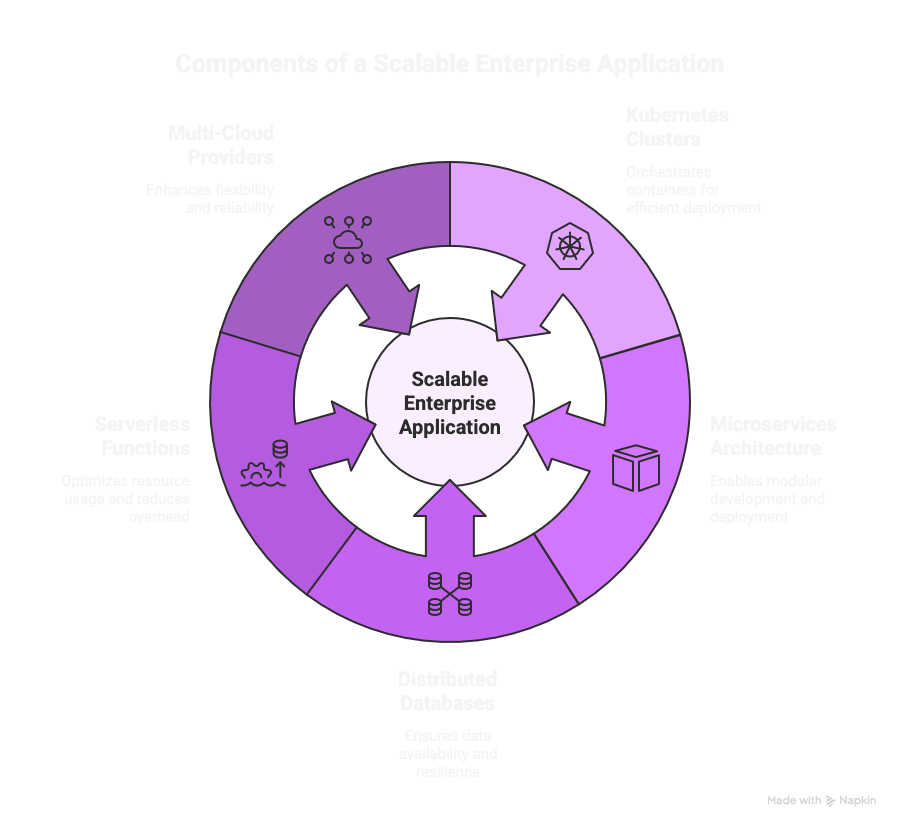
These environments produce large volumes of operational data every minute. DevOps teams must process this data quickly to maintain system reliability.
Without AI, DevOps teams face several challenges.
Challenge #1 – Alert fatigue
Monitoring tools generate many alerts. Many of these alerts are duplicates or false positives. Engineers may spend hours analyzing alerts that are not critical.
AI can filter alerts and highlight the ones that truly require attention.
Challenge #2 – Slow root cause analysis
When incidents occur, engineers must analyze logs, metrics, and deployment events. This process can take hours.
AI can automatically correlate system signals and identify likely root causes.
Challenge #3 – Long testing cycles
Large applications may have thousands of automated tests. Running all tests for every code change can slow down CI pipelines.
AI can prioritize tests based on code changes and historical results.
Challenge #4 – Operational workload
DevOps engineers spend time on repetitive tasks such as:
- checking logs
- restarting services
- writing documentation
- analyzing incidents
AI automation reduces these manual tasks and improves team productivity.
5 Key Use Cases of AI in DevOps Pipelines
AI can be applied across the entire DevOps lifecycle. Below are some of the most practical and impactful use cases.
Use case #1) Intelligent CI/CD Pipeline Optimization
In a traditional CI/CD setup, every code change triggers the same test suite and build path regardless of scope or risk.
This approach is resource-intensive and slow.
AI-enhanced CI/CD systems analyze historical build data, code change patterns, and test results to optimize the process.
They identify which tests are most relevant to a given change, flag commits that carry higher risk, and route builds through the most efficient paths.
The result is faster feedback cycles, fewer redundant test runs, and more targeted use of compute resources. Teams receive meaningful signals sooner, which accelerates the entire delivery flow.
Use case #2) Predictive Monitoring and Anomaly Detection
Without AI, monitoring tools generate alerts based on fixed thresholds.
This creates noise.
A CPU spike above 80% triggers an alert whether the cause is a genuine incident or a routine batch job.
AI-powered monitoring tools, particularly those built on machine learning models, move beyond static thresholds.
They establish behavioral baselines for systems and flag deviations that represent genuine risk, such as a memory leak, an unexpected drop in API response time, or a configuration drift that went unnoticed.
This predictive approach allows teams to intervene before problems escalate into production incidents. It shifts the operating model from firefighting to prevention.
Use case #3) AI-Powered Test Orchestration
Running a full regression suite on every commit consumes valuable time and cloud resources.
AI-powered test orchestration tools prioritize tests based on the specific code changes introduced, historical failure patterns, and even developer behavior.
Tests most likely to catch issues run first. Flaky tests are identified and quarantined.
This approach delivers faster feedback without sacrificing coverage. It also frees QA teams to focus on quality analytics and test strategy rather than execution
Use case #4) Smart Infrastructure and Resource Planning
Manual capacity planning often relies on fixed thresholds or intuition.
AI brings predictive analytics into resource management, analyzing usage trends, seasonal patterns, and past deployment data to forecast infrastructure needs.
This leads to fewer unexpected outages, reduced over-provisioning, and more efficient cloud spend.
For teams running Kubernetes or multi-cloud environments, AI-driven resource planning ensures workloads are allocated based on actual demand patterns rather than worst-case assumptions.
Use case #5) Security Automation with AI in DevSecOps
Security is one of the most impactful areas for AI integration in DevOps.
AI tools can identify vulnerabilities, misconfigurations, and compliance gaps as code moves through the pipeline, without introducing delays.
According to the Global DevSecOps Report 2025, 63.3% of security professionals reported that AI has become a helpful copilot for writing more secure code and automating application security testing.
This is particularly relevant for organizations implementing security operations at scale, where manual security reviews cannot keep pace with the volume of deployments.
How to Implement AI in Your DevOps Pipeline
Knowing how to use AI in DevOps requires more than understanding the technology.
It requires a structured implementation approach.
The following steps provide a practical framework for engineering teams and technology leaders.
Step 1) Assess Your DevOps Maturity
AI amplifies existing DevOps practices.
Before introducing AI tools, audit your current state.
Evaluate the health of your CI/CD pipelines, the consistency of your monitoring and alerting, the degree of automation across provisioning and deployment, and the quality of collaboration between development and operations teams.
Organizations with immature practices will find that AI exposes gaps rather than fills them.
Step 2) Identify High-Impact Opportunities
Start with the areas where manual effort, error rates, or response times are highest.
Common starting points include test execution and prioritization, incident triage and root cause analysis, log parsing and anomaly detection, and infrastructure provisioning.
Focus on use cases where AI can deliver measurable improvement within weeks, not months.
Step 3) Select the Right AI Tools for Your Stack
The AI tool landscape for DevOps is maturing.
Evaluate options based on your existing technology environment and operational needs:
- GitHub Copilot: AI-driven code suggestions integrated with CI/CD pipelines.
- Dynatrace Davis AI: Real-time root cause analysis and anomaly detection across distributed systems.
- Harness: AI-powered test automation, incident response, and security testing orchestration.
- GitLab Duo: In-IDE AI assistance with pipeline troubleshooting capabilities.
The right tool depends on your stack, team size, and the specific use case you are targeting first.
For teams building custom AI software, integration flexibility and API access are important evaluation criteria.
Step 4) Start Small with Pilot Projects
Run a proof of concept in a single pipeline, service, or environment.
Measure baseline metrics before introducing AI, such as deployment frequency, mean time to recovery, test execution time, and false positive alert rates.
Compare results after the pilot to quantify impact.
This approach builds organizational confidence and provides data to justify broader adoption.
Step 5) Build Feedback Loops and Iterate
AI models improve through continuous feedback.
Design your pipelines so that real-world outcomes, such as build successes, test failures, incident resolutions, and deployment rollbacks, feed back into the AI models.
This creates a continuous improvement cycle where the system becomes more accurate and useful over time. Without feedback loops, AI tools stagnate and lose relevance.
How Evangelist Apps Helps Enterprises Adopt AI in DevOps
Implementing AI in DevOps is a strategic initiative that benefits from experienced guidance.
Evangelist Apps brings over 25 years of software development experience and a track record of delivering AI-powered platforms for enterprises including Third Bridge, British Airways, UBS Bank, and BBC.
Through its AI-Driven Generative Development Services, Evangelist Apps helps organizations design, deploy, and manage enterprise-grade AI solutions.
Generative AI Development Services for DevOps Teams
Evangelist Apps offers generative AI development services designed to integrate directly with enterprise DevOps workflows.
These services include:
- Generative AI Model Design and Deployment: Custom-trained models built using Transformers, GANs, and reinforcement learning, configured for your specific pipeline requirements.
- AI Agent Development: Autonomous agents that handle incident triage, test generation, deployment verification, and pipeline optimization.
- Prompt Engineering for Enterprise Tools: Fine-tuned prompt strategies for integrating LLMs into CI/CD, monitoring, and infrastructure management workflows.
- AI Integration Across the Pipeline: End-to-end integration of AI capabilities into your existing DevOps toolchain, from code review to production monitoring.
Whether you are exploring AI for the first time or scaling across your organization, Evangelist Apps provides end-to-end support.
This includes AI consulting, architecture design, development, integration, and managed services.
The approach is advisory, not prescriptive, focused on aligning AI capabilities with your operational goals and existing technology investments.
Book a FREE consultation to discuss how AI can improve your DevOps pipeline performance, reduce manual overhead, and accelerate your delivery lifecycle.
FAQ: AI in DevOps
Q. How is AI used in DevOps?
AI is used in DevOps to analyze operational data, detect system anomalies, optimize CI/CD pipelines, automate testing, and assist with incident management.
Q. What are the benefits of AI in DevOps?
The main benefits include faster deployments, improved system reliability, reduced operational workload, better monitoring, and faster root cause analysis.
Q. What is generative AI in DevOps?
Generative AI in DevOps uses large language models to generate code, create test cases, produce documentation, summarize incidents, and assist developers with DevOps workflows.
Q. What is an AI agent in DevOps?
An AI agent in DevOps is an intelligent system that monitors infrastructure, detects issues, suggests solutions, and sometimes performs automated remediation tasks.
Q. Can small teams use AI in DevOps?
Yes. Small teams can adopt AI tools for monitoring, testing, and CI/CD optimization. Many modern DevOps platforms already include built-in AI capabilities.
Q. Is AI Replacing DevOps Engineers?
No. The evidence points in the opposite direction. AI is changing the nature of DevOps work, not eliminating it. QA teams are evolving into Quality Engineering teams focused on analytics and orchestration rather than manual test execution. AI handles repetitive, data-intensive tasks. Engineers handle judgment, architecture, and the strategic decisions that determine delivery quality and reliability.
Q. What Is the Role of AI in DevOps?
AI in DevOps serves as an intelligent layer on top of existing automation. While traditional DevOps automation executes predefined tasks, AI introduces the ability to predict outcomes, detect anomalies, learn from historical data, and adapt workflows dynamically. Its role spans the entire software delivery lifecycle, from code generation and testing to deployment, monitoring, and incident response. AI does not replace DevOps engineers. It handles the cognitive overhead of data analysis and pattern recognition so that engineers can focus on architecture, strategy, and complex problem-solving.