


Creating animations in SwiftUI is really easy because of its declarative syntax.
In this article, we’ll dive into the world of SwiftUI animations, starting from the basics to advanced techniques. Whether you want to add subtle transitions or create stunning visual effects, SwiftUI has got you covered.
Want your iOS interface to feel smoother and more polished?
Book a free iOS design review with Evangelist Apps to see where better animation can improve the user experience.
Understanding the Basics
Before diving into advanced techniques, let’s quickly recap the basics of SwiftUI animations. At its core, SwiftUI allows you to animate changes in state by applying the .animation modifier to your views. Here’s a simple example –
struct ContentView: View {
    @State private var scale: CGFloat = 1.0

    var body: some View {
        VStack {
            Spacer()
            Circle()
                .fill(Color.blue)
                .frame(width: 100, height: 100)
                .scaleEffect(scale)
                .animation(.easeInOut(duration: 1.0), value: scale)
            Spacer()
            Button("Animate") {
                scale += 0.5
            }
            .padding()
        }
    }
}
This example animates the scaling of a circle when a button is pressed. We can also do the same using withAnimation function –
struct ContentView: View {
    @State private var scale: CGFloat = 1.0

    var body: some View {
        VStack {
            Spacer()
            Circle()
                .fill(Color.blue)
                .frame(width: 100, height: 100)
                .scaleEffect(scale)
            Spacer()
            Button("Animate") {
                withAnimation(.easeInOut(duration: 1.0)) {
                    scale += 0.5
                }
            }
            .padding()
        }
    }
}
Customizing Animation Curves
SwiftUI provides several built-in animation curves such as .easeIn, .easeOut, .linear. These animations can be customized with parameters like duration, delay, and damping to suit your specific needs.
However, for a more customised experience, you can create your own animation curves using the TimingCurve struct. This allows you to define the pace of your animation more precisely.
let customTiming = Animation.timingCurve(0.2, 0.8, 0.2, 1.0, duration: 1.0)We can apply this to our previous example as follows –
.scaleEffect(scale)
.animation(customTiming, value: scale)
By tweaking the control points, you can create animations that feel unique and tailored to your app’s design.
Animating Multiple Properties
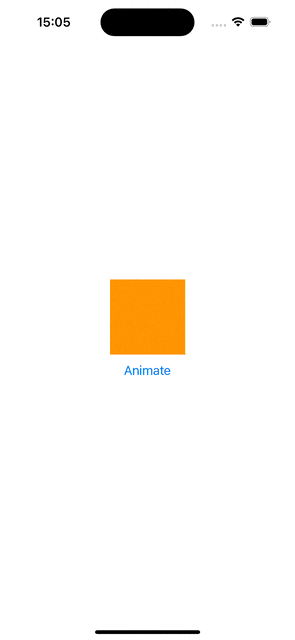
Animating multiple properties simultaneously can create more complex and engaging animations. SwiftUI makes this easy by allowing multiple property changes within the same withAnimation block or .animation modifier.
struct ContentView: View {
    @State private var isAnimated = false

    var body: some View {
        VStack {
            RoundedRectangle(cornerRadius: isAnimated ? 50 : 0)
                .fill(isAnimated ? Color.purple : Color.orange)
                .frame(width: isAnimated ? 200 : 100, height: isAnimated ? 200 : 100)
                .rotationEffect(Angle(degrees: isAnimated ? 360 : 0))
                .animation(.easeInOut(duration: 2.0), value: isAnimated)

            Button("Animate") {
                isAnimated.toggle()
            }
        }
    }
}
This will create the following animation –
Animating View Transitions
SwiftUI provides a convenient way to animate view transitions using the .transition modifier. This is particularly useful for adding or removing views from the view hierarchy.
struct ContentView: View {
    @State private var showRectangle = false

    var body: some View {
        VStack {
            if showRectangle {
                RoundedRectangle(cornerRadius: 25)
                    .fill(Color.green)
                    .frame(width: 200, height: 200)
                    .transition(.slide)
            }

            Button("Toggle View") {
                withAnimation {
                    showRectangle.toggle()
                }
            }
        }
    }
}
Gesture-Driven Animations
Using SwiftUI, you can create animations that respond to user gestures. This allows you to provide a more interactive experience.
struct ContentView: View {
    @State private var offset = CGSize.zero

    var body: some View {
        Circle()
            .fill(Color.red)
            .frame(width: 100, height: 100)
            .offset(offset)
            .gesture(
                DragGesture()
                    .onChanged { gesture in
                        offset = gesture.translation
                    }
                    .onEnded { _ in
                        withAnimation(.spring()) {
                            offset = .zero
                        }
                    }
            )
    }
}
Here, the circle follows the user’s drag gesture. When the gesture ends, the circle returns to its original position with a spring animation.
SwiftUI’s animation features let you create engaging app interfaces with ease. By learning simple animations, you can make your apps look and feel amazing. I hope this article helps you become familiar with animations so you can use them in your next project!