

Push notifications in iOS apps play a critical role in user engagement by delivering timely, personalized messages directly to users’ devices through Apple Push Notification Service (APNs). From driving retention to enabling real-time updates, iOS push notifications are a core communication channel for modern mobile apps.
In this article, we’ll delve into the captivating usage of push notifications, uncovering how they’ve transformed user interaction and enhanced user experience.
Let’s jump right in.
What Are Push Notifications in iOS Apps?
Push notifications in iOS apps are time-sensitive messages delivered directly to users’ Apple devices to encourage engagement, share updates, and drive meaningful interaction even when the app isn’t open. These alerts reach users through the Apple Push Notification Service (APNs), a secure, scalable delivery system that ensures messages are reliably routed to the right device.
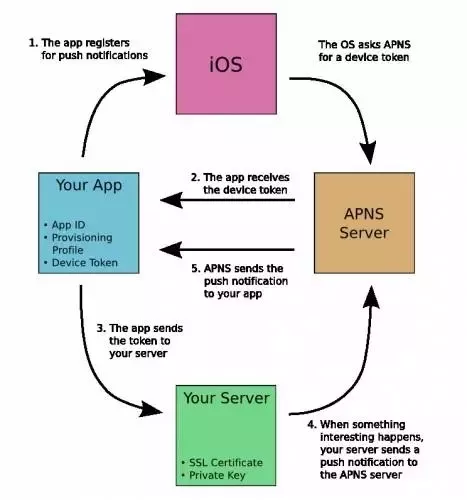
When an iOS app first launches, it registers with APNs and receives a unique device token. This token acts as an address that your backend server uses to send relevant messages. Once the server sends the notification payload to APNs with the device token, APNs forwards the message to the user’s iPhone or iPad.
There are two main types of notifications used in iOS apps:
1. Remote (Push) Notifications – These are sent from a server to APNs and then to the user’s device. Remote push notifications are ideal for delivering:
-
Real-time alerts (messages, reminders, updates)
-
Personalized content based on behavior or preferences
-
Offers, promotions, or action triggersThey play a key role in boosting app engagement and retention by prompting users to return.
2. Local Notifications: These are scheduled on the user’s device without needing a server connection at delivery time. Local notifications work well for:
-
Time-based reminders
-
Calendar alerts
-
Location-triggered notices
They allow apps to provide timely information without requiring active server communication at the moment of delivery.
Together, these notification types help app developers create a responsive, user-centric communication strategy that keeps users informed and engaged while respecting their preferences.
What Are the Types of Push Notifications?
There are three types of Push Notifications. Let’s discover them:
- Web Push Notifications — The notifications are sent mainly through Desktop web or mobile web. On desktop, messages slide from the screen’s top or bottom, while mobile devices showcase standard pop-up Push Notifications.Web Push Notifications arrive when users are active, regardless of website usage.
- Desktop Push Notifications — These notifications appear only on the user’s desktop, triggered by the apps that are already installed there.
- Mobile app Push Notifications — These tailored messages pop up on the user’s screen when they are actively using their device.
How Do iOS Push Notifications Actually Work?
These notifications are either generated by the app locally or remotely from your server.
The app-generated notifications are often triggered by specific events like time or location, crafting content tied to these events.
On the other hand, remote notifications are generated by the by backend server when certain events are triggered.
Here’s how it works overall –
On the first launch of the app, it requests the Apple APNS server for the device token (which is unique for the app running on that device)APNS delivers the device token to the app.
The app sends this device token to its server or involves other third-party push notification service providers. If the system uses its own architecture, the provider sends a request to Apple along with the device token and push details.
Then, the APNS sends the Push Notification to the users.Notification of specific content will be received by the users.
Role of Push Notifications in iOS Apps
Push notifications help iOS apps stay connected with users and improve engagement. They deliver short messages directly to the device’s lock screen or notification center. This makes them useful for keeping users informed and prompting them to take action.
1. Boost User Engagement
Push notifications remind users about the app and encourage them to open it. For example:
-
Updates about new content or features
-
Reminders for unfinished activities
-
Personalized tips based on user behavior
These reminders make users more likely to return to the app regularly.
2. Deliver Real-Time Alerts
Push notifications are ideal for sending time-sensitive information, such as:
-
Order confirmations
-
Appointment reminders
-
Security alerts or transaction updates
Users receive these notifications instantly, keeping them informed without opening the app.
3. Personalize the Experience
Notifications can be tailored to user preferences and actions. For example:
-
A shopping app sends product suggestions based on past views
-
A fitness app sends reminders when workouts are missed
Personalized notifications increase relevance and user satisfaction.
4. Re-Engage Inactive Users
Push notifications can bring back users who haven’t opened the app in a while. Targeted messages like special offers, updates, or reminders help reduce user churn and improve retention.
What Are the Benefits of Push Notifications for iOS Apps?
iOS Push Notifications not only benefit the developers but also assist businesses in various ways. This is also an effective tool for marketing and reaching out to the customer base.
Here are the most significant benefits of iOS Push Notifications.
1. Real-Time Alerts
The real-time alert feature of iOS Push Notifications allows you to customize and automate Push Notifications based on the user’s activity. By incorporating different marketing tools and SAAS, you can keep track of the time and activity of users and grasp their behaviour patterns.
This data ensures that the notification content is relevant, timely, and personalized according to your user’s preferences.
It also allows the users to get instant information and saves them from the hurdle of opening an email and finding the ad. The iOS notifications pop up during their most active time, handing the information users might be seeking.
2. Boost Customer Engagement
Push Notifications come with great customer-engaging power. That’s why businesses frequently incorporate this tool in their marketing campaigns. It allows you to interact directly with users, informing them about exclusive deals, innovative features, and upcoming events.
These concise, personalized, and striking messages prompt them to visit the website and discover what’s new.
But that’s not it; the iOS Push Notification empowers you to optimize customer interactions, ensuring a smooth experience and ultimately enhancing users’ engagement.
3. Enhanced Conversion Rates
Customers go through many stores daily, and after adding items to their cart, they leave without making a purchase. Making a buying decision from a store is not easy when there are tons of other options available. Similarly, only luring customers to your website is not enough; you need to convert them. And that’s the most challenging step of this whole process.
Once you get your ideal customer, it’s crucial to reel them in. And here, push notifications come into play. Push notifications make the user see what the business offers and how it aligns with their needs. If the content is well-crafted, compelling, and resonates with the users, it will surely enhance their conversion rate.
4. Enhanced Customer Care
Unlike SMS or emails, push notifications have greater potential and a higher open rate. This remarkable attribute positions it as a powerful tool for elevating customer satisfaction with unparalleled efficiency.
When a notification pops up on the user’s screen with content that aligns with their interest, it eventually enhances their customer journey.
For instance, the app monitors the interactions; it may track any problem that the user encounters. Following this, a pop-up notification appears that directs them to the relevant help section of the FAQ page. This page has ready solutions tailored according to their problem. Thus, it eventually transforms the user’s experience in a seamless manner.
Wrapping up
Summing it up, iOS Push Notification has played a vital role in engaging with users and boosting their involvement. The personalized notifications offer real-time alerts, enhance customer engagement, boost conversion rates, and elevate customer care.
By integrating user behaviour and preferences, these push notifications created a dynamic bridge between businesses and their audiences.
At Evangelist Apps, we build high-quality iOS apps that uses smart push notification strategies tailored to your audience. From APNs integration to segmented, personalized messaging, our team of iOS app development experts ensures your app uses notifications not just as alerts, but as powerful engagement drivers.
Ready to improve user engagement and retention with intelligent push notifications?
Contact Evangelist Apps today to discuss your iOS app project and get a custom road map for your iOS app.
Frequently Asked Questions About iOS Push Notifications
1. What is an iOS push notification?
An iOS push notification is a message sent from a remote server to a user’s Apple device through the Apple Push Notification Service (APNs). These notifications appear on the lock screen or as banners and can include text, images, badges, or sounds. They are used to deliver timely information, reminders, updates, and alerts even when the app is not open.
2. How do push notifications work in iOS apps?
Push notifications in iOS apps work through a three-step process:
-
The app registers with APNs to get a device token.
-
The server sends the notification payload with the token to APNs.
-
APNs delivers the message to the user’s iPhone or iPad.
3. What are the benefits of push notifications for iOS apps?
iOS push notifications help app owners:
-
Increase engagement by bringing users back to your app
-
Boost retention with timely reminders and suggestions
-
Deliver real-time updates like messages, offers, or alerts
-
Personalize user experience using behavior data
-
Drive conversions by prompting targeted actions
These benefits make push notifications a key tool for user growth and ongoing interaction.
4. Are iOS push notifications effective for user retention?
Yes, when used strategically, push notifications for iOS apps significantly improve user retention. Notifications that are personalized, timely, and relevant remind users of app value, encourage return visits, and foster long-term engagement. However, overly frequent or irrelevant notifications can lead to opt-outs, so best practices include segmentation and frequency control.
5. How can developers optimize push notifications in iOS for better results?
To optimize push notifications on iOS:
-
Segment your audience to send relevant messages
-
Use rich content like images, action buttons, and emojis
-
Personalize message text and timing
-
Respect user preferences and frequency limits
-
Measure engagement metrics like opens and conversions
Following these practices increases user interaction and prevents notification fatigue.