



TL;DR
Power BI helps you turn raw data into clear, decision-ready stories by combining the right visuals, focused KPIs, and contextual design. This guide explains how to choose effective charts, structure dashboards for insight and apply these principles through a real-world sales reporting example so stakeholders can understand trends and act faster.
In today’s data-driven world, organizations collect more information than ever before. But there’s a catch—data alone doesn’t drive action. Insight does.
Raw numbers can overwhelm, confuse, or even mislead unless they’re shaped into a story that people can understand and act upon.
This is where Power BI comes in not just as a data visualization tool but as a powerful storytelling platform. For C-Suite leaders, Marketing Managers, and Heads of Digital, this means bridging the gap between numbers and narrative to make smarter decisions.
Here’s how you can move from data to insights using Power BI by focusing on the core elements of storytelling: visuals, clarity, and context.
What are Power BI insights?
Power BI insights are actionable conclusions drawn from data that help teams understand performance, identify trends, and make informed decisions. Instead of showing raw numbers, Power BI insights highlight what changed, why it matters, and what action to take next.
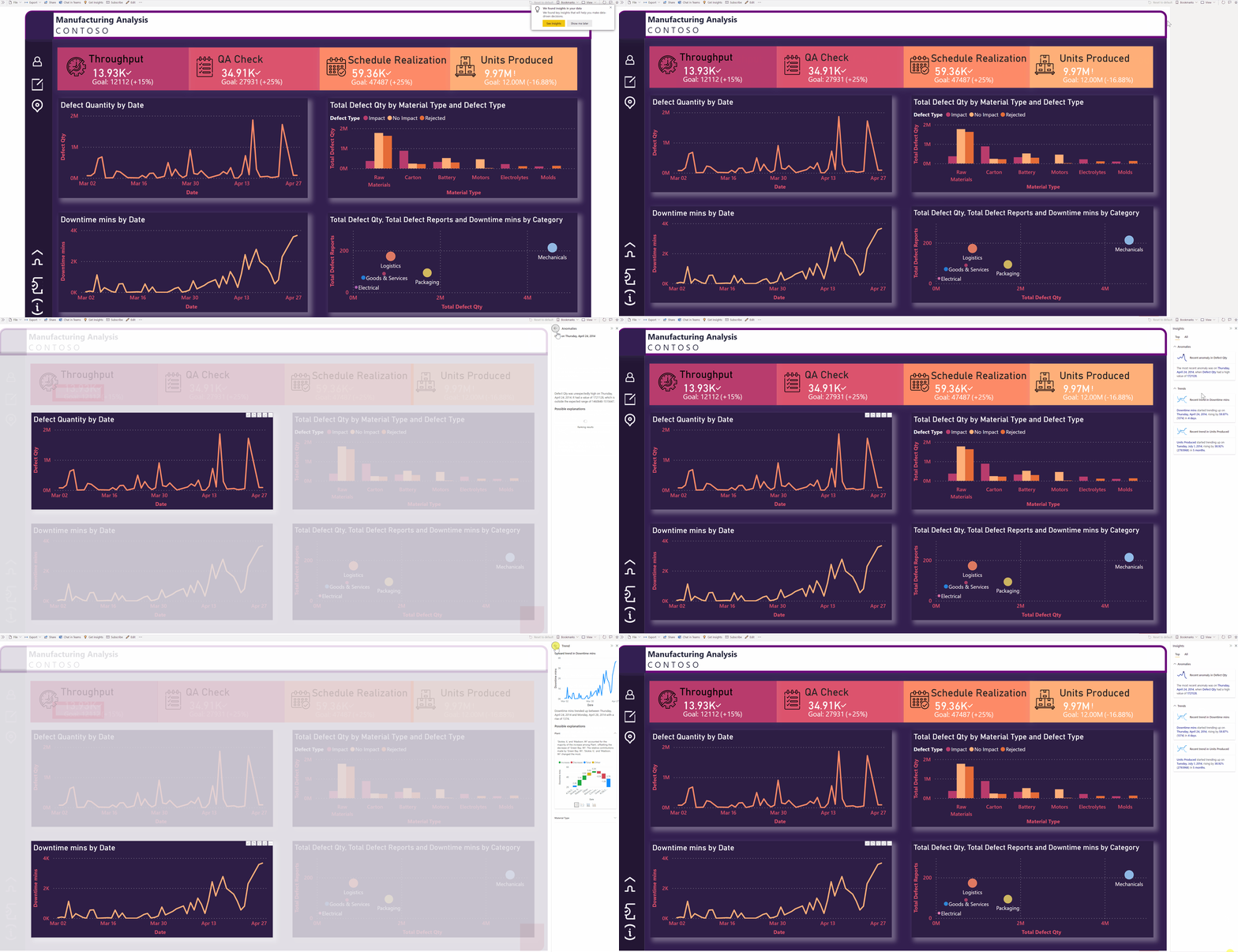
Example of how Power Bi insights work (Credit: Microsoft)
In Power BI, insights typically come from:
-
Summary KPIs that highlight performance against targets
-
Trend and comparison visuals that reveal patterns over time
-
Contextual labels, tooltips, and annotations that explain why numbers move
Well-designed Power BI insights reduce interpretation effort and help decision-makers focus on outcomes, not dashboards.
Power BI Data Insights: How to Extract Them?
Extracting meaningful data insights in Power BI requires a structured workflow, not just good visuals.
A proven approach looks like this:
-
Connect the right data sources – Start with clean, relevant data. Remove unused fields and align metrics with business goals before modeling.
-
Model and clean the data – Use Power Query to standardize formats, handle missing values, and create calculated measures that reflect real business logic.
-
Visualize with intent – Choose visuals based on the question being answered—trends, comparisons, or performance against benchmarks.
-
Add context and guidance – Use titles, subtitles, tooltips, and conditional formatting to explain why the insight matters and what to do next.
This process ensures Power BI data insights are reliable, interpretable, and decision-focused.
Why Storytelling with Data Matters
For decision-makers, dashboards are often the first stop for answers. But a dashboard cluttered with charts can raise more questions than it answers.
- Visuals are the language of data. Just as words form the structure of a story, charts and graphs form the structure of insights.
- Without a clear narrative, data fails to connect emotionally or logically with its audience.
- With Power BI, you can craft dashboards that don’t just inform—they inspire action.
Choose the Right Visuals for Power Bi Insights
One of the most common mistakes in dashboard design is misusing visual types. A beautiful chart that tells the wrong story is worse than no chart at all.
Here are some visual storytelling principles:
| Visual Type | Best Use Case | When to Use It |
|---|---|---|
| Line Chart | Trends over time | Monthly or yearly performance tracking |
| Bar / Column Chart | Category comparison | Comparing products, regions, or teams |
| KPI Card | High-level performance metrics | Executive summaries and dashboards |
| Table / Matrix | Detailed breakdowns | Operational analysis and audits |
| Scatter Chart | Correlation analysis | Identifying relationships between variables |
| Funnel Chart | Stage-based conversion analysis | Sales or marketing pipelines |
Here are some more visual items that you can try –
- Maps – Ideal for geographic data but avoid over-cluttering with too many data points.
- Box Plots & Histograms – Powerful for exploring distributions, variability, and outliers.
Pro Tip: Don’t default to what “looks nice.” Ask yourself: “What story should this data tell?”. Avoid mixing too many visual types on one page. Each dashboard view should answer one primary business question.
Real-World Example: Power BI Insights for REC
The Recruitment & Employment Confederation (REC) needed better visibility into Microsoft Teams call and meeting activity. Their reporting relied on manual spreadsheets, making it slow, inconsistent, and difficult to extract meaningful insights.
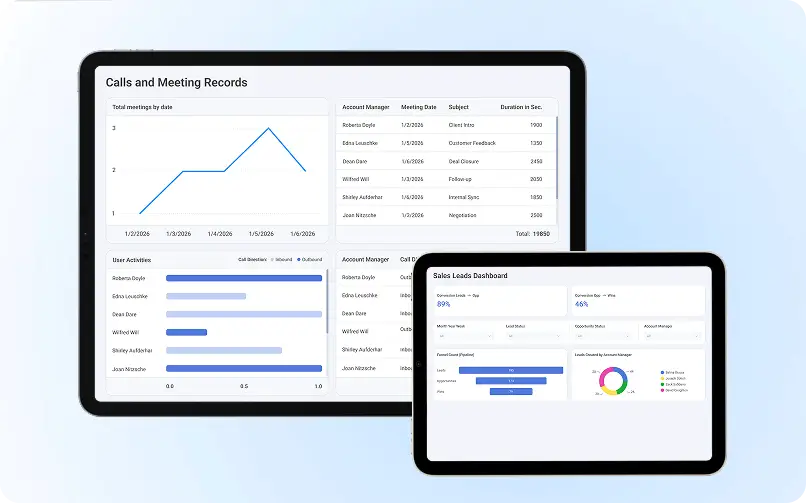
Evangelist Apps, one of UK’s leading business intelligence services provider, designed an automated analytics solution using Power BI and SQL, integrating Teams call and meeting data into a centralized reporting system. Interactive dashboards now surface key metrics such as total calls, meeting duration, user activity, and trends over time.
The impact:
-
Removed manual reporting and spreadsheet dependency
-
Enabled real-time visibility into communication patterns
-
Improved data accuracy and consistency
-
Gave leadership clear, actionable insights at both summary and user levels
Outcome: Power BI transformed REC’s communication data into clear, decision-ready insights. supporting faster reviews, better oversight, and scalable reporting.
Book a free consulting call with us to discuss your data visualization project.
How to Design Power Bi Dashboards that Drive Understanding
Good storytelling isn’t just about what you say, it’s about how it’s presented.
1. Clarity Over Complexity
- Avoid unnecessary visuals, excessive colors, and dense layouts.
- Focus on 3–5 key metrics per view to avoid overwhelming users.
2. Consistent Colors and Typography
- Use a cohesive color palette to guide attention (e.g., red for declines, green for growth).
- Limit fonts to 1–2 types for readability and consistency.
3. Logical Layout
Think of your dashboard as a story arc:
- Top: KPIs and headline insights.
- Middle: High-level breakdowns.
- Bottom: Detailed drilldowns.
4. Accessibility Matters
- Use high-contrast colors and labels for screen readers.
- Avoid relying solely on color to convey meaning (e.g., red vs. green).
From Reports to Guided Insights: Adding Context
Power BI makes it easy to enrich your dashboards with context:
- Titles & Subtitles: Frame visuals with clear, action-oriented headlines.
E.g., “West Region Sales Dip 18% in Q1” instead of “Sales Report.” - Tooltips & Annotations: Offer guidance without clutter.
- Summary Cards: Keep KPIs like Total Revenue or Customer Churn Rate front and center.
- Bookmarks & Drillthroughs: Enable interactive storytelling to explore deeper insights.
Final Thoughts: Turning Data Into Actionable Stories
Data storytelling isn’t a “nice-to-have” anymore, it’s a business imperative.
As a Business Intelligence developer, analyst, or digital leader, your role isn’t just to create dashboards. It’s to create clarity. To guide, inform, and influence decisions through well-crafted stories.
Next time you open Power BI, ask yourself:
“What story am I telling—and will my audience understand it at a glance?”
Because when we move from data to insights, we don’t just share numbers. we drive action.
If you are planning to choose a Power Bi developer, contact Evangelist Apps today.
F.A.Q: Power BI Insights
Q. What are Power BI insights?
Power BI insights are actionable findings derived from data that highlight trends, performance gaps, and anomalies. They help decision-makers quickly understand what is happening in the business and where action is required.
Q. How do you generate data insights in Power BI?
Data insights in Power BI are generated by cleaning and modeling data, defining meaningful metrics, and using the right visuals. Clear titles, context, and comparisons turn raw data into understandable insights.
Q. What makes insights in Power BI actionable?
Insights in Power BI become actionable when dashboards provide context and direction. This includes focused KPIs, clear explanations, conditional formatting, and drill-through views that show what changed and why it matters.
Q. Which visuals are best for Power BI insights?
The best visuals for Power BI insights depend on the question being answered. Line charts show trends, bar charts support comparisons, KPI cards highlight performance, and tables provide detailed breakdowns when needed.
Q. How many KPIs should a Power BI dashboard include?
A Power BI dashboard should include three to five core KPIs per view. This keeps insights focused, reduces cognitive overload, and helps users make decisions faster.
Q. How does Power BI support data storytelling?
Power BI supports data storytelling by structuring dashboards as a guided narrative. Visual hierarchy, filters, and drill-down paths help users move from high-level summaries to detailed insights logically.