

Legacy software can sometimes become a headache.
Ageing systems increase maintenance costs, create security vulnerabilities, and make it harder to adopt cloud technologies, artificial intelligence (AI), and automation.
Investing in legacy software modernisation helps improve agility, reduce technical debt, and prepare your business for future growth.
This guide explains everything you need to know about software modernisation, including when to modernise, the benefits, common approaches etc. At the end of the article, you will also find a successful software modernisation strategy.
At Evangelist Apps, we help businesses across the UK and worldwide modernise legacy applications through digital transformation, cloud migration, API integration, and custom software engineering.
If you’re looking for a trusted software modernisation company, check out our digital transformation services to learn how we can help upgrade your legacy systems with minimal disruption.
Also, feel free to book a 30-min FREE consultation call with us.
What Is Legacy Software Modernisation?
Legacy software modernisation is the process of improving or transforming existing software applications so they meet today’s business, technology, and security requirements.
Legacy software modernisation usually involves:
- Migrating to the cloud
- Refactoring outdated code
- Rebuilding parts of the application
- Integrating modern APIs
- Improving the user interface
- Enhancing security and compliance
- Upgrading databases and infrastructure
What Is Considered Legacy Software?
Legacy software refers to applications that still support business operations but rely on outdated technologies, architectures, or infrastructure. These systems often continue running because replacing them appears costly or risky.
Software Modernisation vs Building A New One: What to Choose?
It’s an important decision that businesses need to make.
Many businesses assume they must completely rebuild their software. In reality, that is only one of several options.
| Legacy Software Modernisation | Complete Software Replacement |
| Improves existing applications | Develops an entirely new system |
| Preserves valuable business logic | Recreates all functionality |
| Lower cost in many cases | Higher upfront investment |
| Faster implementation | Longer development timeline |
| Lower operational disruption | Greater migration complexity |
Only a thorough assessment can help you determine whether modernising, rebuilding, or replacing your software will deliver the best long-term value.
Why Legacy Systems Become a Business Risk
Many organisations continue using legacy software because “it still works.”
While this may seem practical in the short term, outdated applications gradually become one of the biggest barriers to business growth.
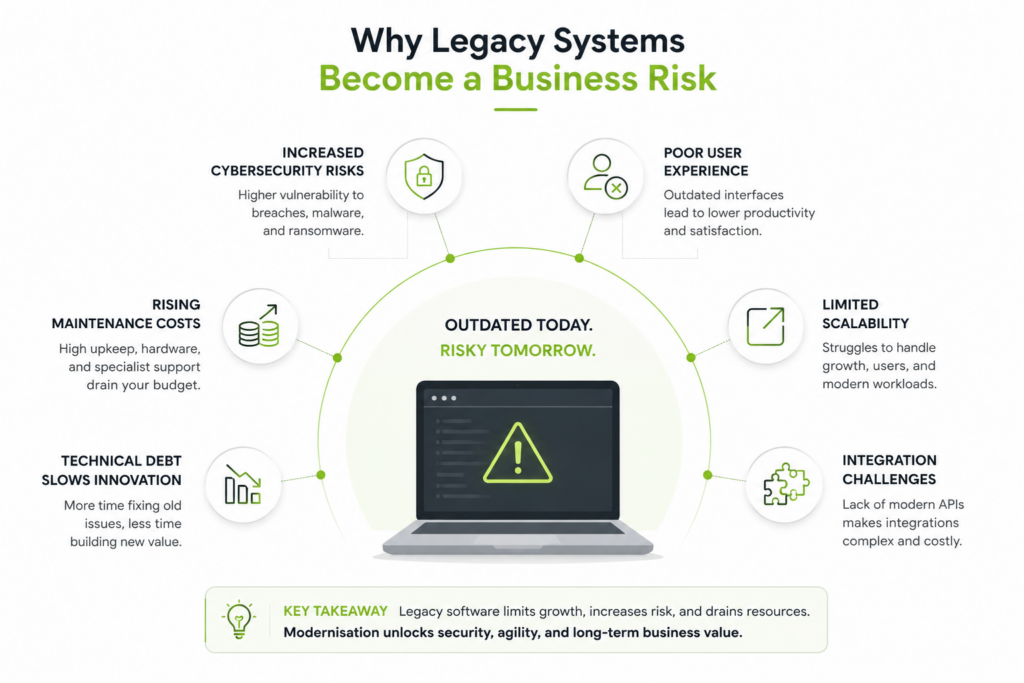
Here are some of the biggest business risks associated with ageing software –
- Rising Maintenance Costs – Older applications often require specialist developers, outdated hardware, and manual processes to remain operational. Over time, maintenance costs can exceed the investment required to modernise the application itself.
- Increased Cybersecurity Risks – Legacy systems frequently run on unsupported operating systems, outdated frameworks, and unpatched software components increasing the risk of data breaches, malware attacks, compliance failures, business downtime etc.
- Poor User Experience – Most Legacy applications often suffer from slow loading times, outdated UI, complex workflows, difficult navigation, limited mobile compatibility etc.
- Limited Scalability – Legacy business software often fails with higher user volumes, increased transaction loads, cloud deployment, API integrations etc.
- Integration Challenges – Legacy applications often lack modern APIs, making integrations slow, costly, and technically challenging.
- Technical Debt Slows Innovation – Every temporary workaround added over the years contributes to technical debt. Eventually, development teams spend more time fixing legacy issues than building new capabilities. This slows down product launches, feature releases, AI adoption etc.
The 7Rs Framework for Legacy Software Modernisation
Now let’s understand about the 7Rs Framework.
It’s a proven model that helps determine the most suitable approach for software modernisation based on cost, complexity, business value, and technical requirements.
Quick overview of the 7Rs Framework
| Modernisation Approach | Best For | Investment | Business Disruption |
| Rehost | Quick cloud migration | Low | Low |
| Replatform | Performance improvements | Low-Medium | Low |
| Refactor | Improving existing code | Medium | Low-Medium |
| Rearchitect | Long-term scalability | High | Medium |
| Rebuild | Modernising outdated applications | High | Medium-High |
| Replace | Standard business processes | Medium-High | Medium |
| Retire | Obsolete applications | Low | Low |
1. Rehost (“Lift and Shift”)
Rehosting involves moving an application from on-premise infrastructure to the cloud without making significant changes to its codebase.
Rehosting is best suited for:
- Applications that are still stable
- Businesses looking for faster cloud adoption
- Reducing infrastructure costs
- Improving disaster recovery
Benefits of Rehosting
- Fast implementation
- Minimal code changes
- Reduced hardware costs
- Improved availability
Example: Migrating a legacy Windows application from physical servers to Microsoft Azure or AWS.
2. Replatform
Replatforming introduces small improvements while keeping the application’s core architecture intact.
Common changes include:
- Database upgrades
- Containerisation
- Operating system upgrades
- Cloud-managed services
Replatform is best suited for:
- Applications needing performance improvements
- Businesses preparing for cloud-native operations
- Organisations seeking better scalability without rebuilding everything
3. Refactor
Refactoring improves the internal structure of an application without changing its functionality.
Instead of replacing the software, developers optimise the code to improve maintainability, performance, and scalability.
Typical improvements include:
- Removing technical debt
- Optimising database queries
- Improving API architecture
- Updating development frameworks
- Improving code quality
Refactoring is often the most cost-effective option when the application’s business logic remains valuable.
4. Rearchitect
As business requirements evolve, older software architectures may struggle to support new capabilities.
Rearchitecting redesigns the application’s underlying architecture to improve flexibility and long-term scalability.
This often includes:
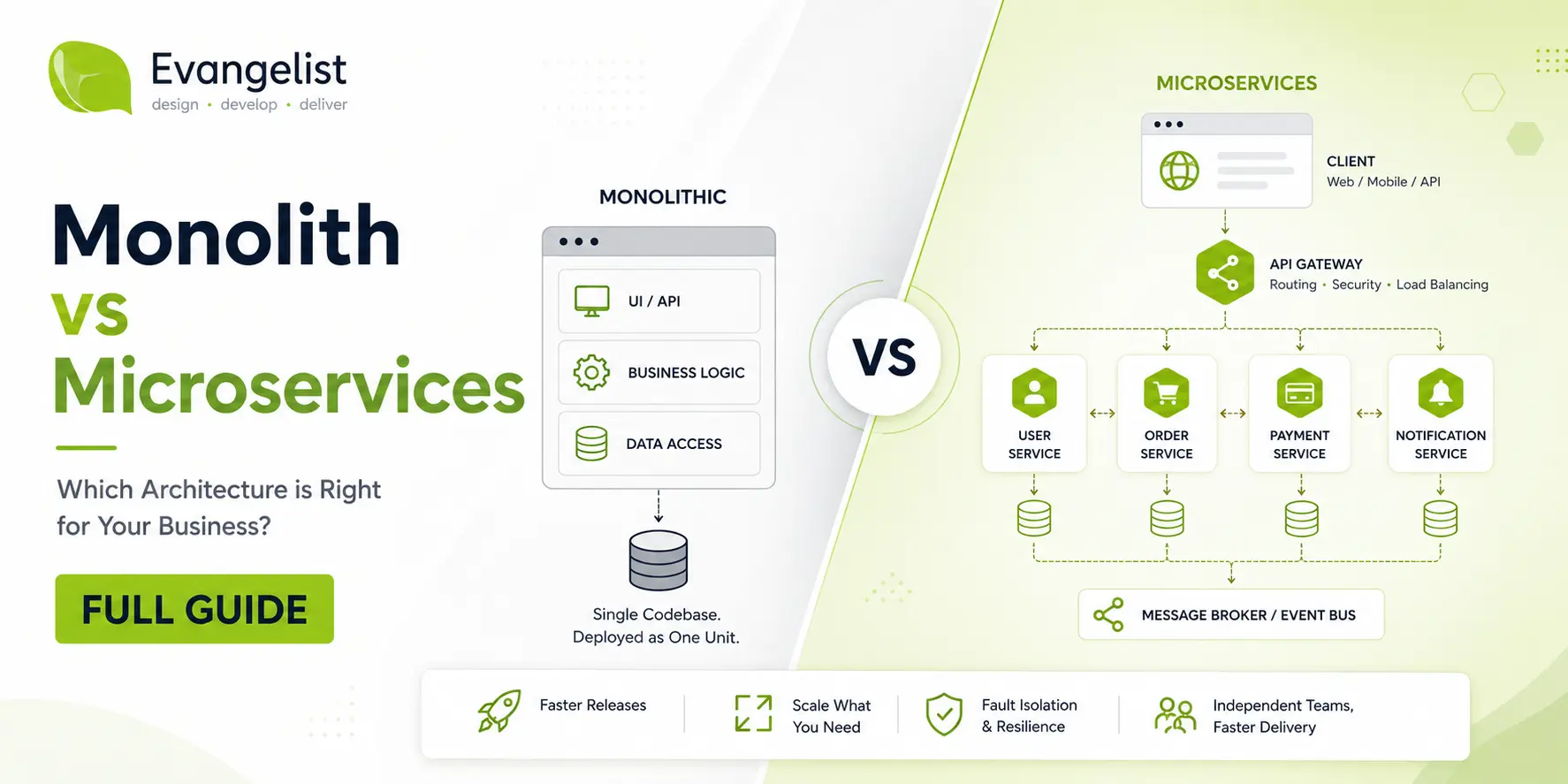
- Microservices architecture
- Event-driven systems
- API-first design
- Cloud-native infrastructure
- Distributed databases
Rearchitect is best suited for:
- Enterprise applications
- High-growth businesses
- AI integration
- Multi-region deployments
5. Rebuild
Sometimes, the existing application has become too outdated to improve effectively.
Rather than maintaining old code, businesses rebuild the software using modern technologies while preserving essential business processes.
Rebuilding provides opportunities to:
- Improve user experience
- Increase security
- Simplify maintenance
- Introduce automation
- Prepare for AI adoption
Although rebuilding requires greater investment, it delivers significant long-term value.
6. Replace
Not every application should be custom-built.
For common business functions such as CRM, HR, or accounting, replacing legacy software with modern SaaS platforms may provide a faster return on investment.
Examples include replacing legacy systems with:
- Microsoft Dynamics 365
- Salesforce
- SAP S/4HANA
- Oracle Cloud Applications
Replacement reduces maintenance responsibilities while giving businesses access to continuous product updates.
7. Retire
Some applications no longer provide meaningful business value.
Retiring obsolete software reduces:
- Licensing costs
- Maintenance expenses
- Security risks
- Operational complexity
Before retiring an application, organisations should ensure that all critical data has been migrated or archived appropriately.
Which Modernisation Approach Is Right for Your Business?
There is no one-size-fits-all answer. The right approach depends on factors such as:
- Business objectives
- Technical debt
- Application complexity
- Budget
- Compliance requirements
- Growth plans
- Integration needs
Many organisations use a combination of multiple approaches across different applications to maximise return on investment while reducing implementation risk.
💡 Expert Tip: Start by modernising applications that have the highest business impact and the lowest implementation risk. Early successes build confidence and create momentum for larger transformation projects.
7-Step Legacy Software Modernisation Roadmap
A successful legacy software modernisation project starts with a clear roadmap.
Here’s one example for your reference –
Step 1) Assess Your Existing Applications
Evaluate your current software landscape by reviewing:
- Business value
- Technical health
- Maintenance costs
- Security risks
- Performance
- Integration capabilities
- User experience
This helps identify which applications should be modernised first.
Step 2) Define Business Goals
Align your modernisation plan with measurable business outcomes.
Ask questions such as:
- What business problem are we solving?
- Do we need better scalability?
- Are we planning cloud or AI adoption?
- Do we want to reduce maintenance costs?
- Are there compliance requirements to address?
Clear goals help prioritise investments and measure success.
Step 3) Prioritise Applications
Modernise the applications that will deliver the greatest business impact first.
Prioritise based on:
- Business criticality
- Customer impact
- Technical debt
- Security risk
- Return on investment (ROI)
Step 4) Choose the Right Modernisation Strategy
Use the 7Rs Framework to determine the best approach for each application.
Depending on your requirements, you may choose to:
- Rehost
- Replatform
- Refactor
- Rearchitect
- Rebuild
- Replace
- Retire
Selecting the right strategy early reduces costs and implementation risks.
Step 5) Implement in Phases
Avoid large-scale migrations wherever possible.
A phased rollout helps you:
- Minimise downtime
- Validate each stage
- Resolve issues early
- Collect user feedback
- Maintain business continuity
Step 6) Test Before Deployment
Validate the application before launch with:
- Security testing
- Performance testing
- Integration testing
- User acceptance testing (UAT)
- Disaster recovery testing
Thorough testing improves reliability and reduces production issues.
Step 7) Monitor and Optimise
Modernisation is an ongoing process.
After deployment, continuously monitor:
- Application performance
- Security
- Infrastructure costs
- User feedback
- Business KPIs
Use these insights to optimise the application and support future business growth.
Common Legacy Software Modernisation Challenges (& How to Overcome Them)
Modernisation projects are rarely without challenges. However, most risks can be reduced through proper planning, stakeholder involvement, and phased implementation.
| Challenge | Best Practice |
| Data migration complexity | Audit, clean, and validate data before migration |
| Unexpected downtime | Use phased deployments with rollback plans |
| Budget overruns | Prioritise high-value applications first |
| Integration issues | Adopt API-first architecture and middleware |
| Resistance to change | Involve users early and provide training |
| Security concerns | Apply Zero Trust principles and security testing |
| Skills shortages | Partner with an experienced software modernisation company |
| Scope creep | Define clear project objectives and governance |
Future-Proof Your Business with Legacy Software Modernisation
Modernising legacy software requires a technology partner who understands business transformation, emerging technologies, and long-term scalability.
At Evangelist Apps, we help SMEs and enterprises modernise business-critical applications without disrupting day-to-day operations.
Our approach focuses on delivering measurable business outcomes rather than simply replacing outdated systems.
What Evangelist Apps Deliver for Legacy Software Modernisation
- Legacy software assessment and modernisation planning
- Cloud migration and cloud-native application development
- Application refactoring and re-engineering
- API integration and system interoperability
- AI-ready software architecture
- Enterprise web and mobile application development
- Ongoing optimisation and support
Why Organisations Choose Evangelist Apps
- Over 20 years of software engineering expertise
- Experience delivering projects for SMEs and enterprise organisations
- AI-first approach to digital transformation
- UK-based expertise with global delivery capabilities
- Modern technology stack across cloud, web, mobile, and AI solutions
- Focus on scalable, secure, and future-ready software.
Ready to modernise your legacy software?
Check out our Digital Transformation Services and book a FREE call with our team of experts for a personalized legacy modernisation roadmap & action plan.
Schedule your FREE consultation call here.
Frequently Asked Questions (FAQs)
Q. What is legacy software modernisation?
Legacy software modernisation is the process of upgrading existing applications to improve their security, performance, scalability, and compatibility with modern technologies without necessarily replacing the entire system.
Q. What is the difference between software modernisation and digital transformation?
Software modernisation focuses on upgrading existing applications and technology. Digital transformation is a broader business initiative that combines technology, processes, and people to improve how an organisation operates and delivers value.
Q. Why is legacy software modernisation important?
It helps businesses reduce maintenance costs, improve cybersecurity, enhance user experience, support cloud adoption, and prepare applications for future technologies such as artificial intelligence and automation.
Q. What are the most common approaches to software modernisation?
The most widely used approaches are the 7Rs:
- Rehost
- Replatform
- Refactor
- Rearchitect
- Rebuild
- Replace
- Retire
Each approach is suited to different business and technical requirements.
Q. How long does a legacy software modernisation project take?
Project timelines depend on application complexity, business requirements, and the chosen modernisation approach. Smaller projects may take a few months, while enterprise-wide transformation programmes can span a year or more.
Q. Should I modernise my software or replace it completely?
Not necessarily. Many organisations achieve better results by modernising existing applications rather than rebuilding them. A technical assessment helps determine the most cost-effective option.
Q. What are the biggest challenges during software modernisation?
Common challenges include:
- Data migration
- System downtime
- Integration complexity
- Budget management
- User adoption
- Managing technical debt
A phased implementation strategy significantly reduces these risks.
Q. Can legacy applications be moved to the cloud?
Yes. Many legacy applications can be migrated using approaches such as rehosting, replatforming, or rearchitecting, depending on the application’s architecture and business goals.
Q. What industries benefit most from legacy software modernisation?
Almost every industry benefits, including:
- Financial services
- Healthcare
- Retail
- Manufacturing
- Logistics
- Education
- Professional services
- Government organisations
Any business relying on ageing software can improve efficiency, security, and scalability through modernisation.
Q. How can Evangelist Apps help with legacy software modernisation?
Evangelist Apps provides end-to-end software modernisation services, including legacy system assessment, cloud migration, application re-engineering, API integration, AI enablement, and ongoing support. We help businesses modernise existing software while minimising operational disruption and creating scalable, future-ready digital solutions.